
Find the Page ID or Post ID in WordPress


Although WordPress is quite intuitive in most cases, there are some things that are not as obvious, such as:
“Where do you find the the page ID in WordPress?”
This is especially useful if you’re trying to exclude by Page ID certain pages that appear in the Pages Widget.
This tutorial will show you how to quickly find the hidden Page ID or Post ID in WordPress.
- Log in to your WordPress site.
- In the left menu click on Pages, then the title of the Page. In the image below, the title is “About Steve”.

- The Page ID is hidden in the URL. Look for post= and the number to the right of it is your Page ID. In the image below, the ID is 6.
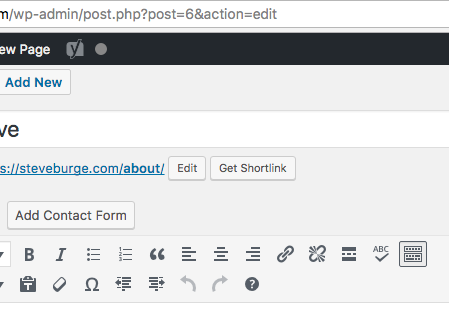
This technique also works for the Post ID of your pages.
- Click “Posts” in the admin menu.
- Click a Post title.
- The Post ID will be visible in the URL bar. In this case, the Post ID is 1702.


global $post;
$page_id = $post->ID;
your code is for posts, not for pages
on wordpress, page = post
Really post=page, have you ever worked with wordpress?
Thanks guys. Very useful stuff simple and effective.
brilliant post, I was wondering how to do this – so simple! thankyou!
Thank you, thank you, thank you!
YES! Finally! Thanks 🙂
I have been looking everywhere to find this. Such a simple solution! Thank you very much for sharing this!
Also, you can find the ID by just placing your mouse over the name of the page in your page list. It will appear in the bottom left corner of your browser.
Simple and to the point. Thanks!
Hey everyone,
I’m glad the tutorial’s been helpful. Thanks for the comments!
Cheers
What? No one uses custom link structure?
Thanks! Just saved me from installing an unnecessary plugin.
Hi can someone please help. I want to embed a page’s (and not post) content in my home age by using the shortcode of that page.
The url of the page while editing is https://mysite.com/wp-admin/post.php?post=929&action=edit . Is there a way i can do this without bloating with plugins? I tried using short code [page id = “929”] and [post id = “929”] but didn’t work.
Thanks for your very helpful pages. Worked great on the widget for Pages. Forgot where the ID was at. Can now show my client what it will look like before it goes live in the Pages menu for the widget. Thank you very much for these pages.