
Use the Drupal Widgets Module For Reusable Content

The Widgets module allows you to centrally manage text and code snippets across your Drupal site.
You can also combine the snippets into sets for even easier re-use.
Widgets provides some pre-defined snippets but also allows you create your own. In this tutorial we’re going to do both.
We’re going to show you how to:
- Use pre-defined widgets to show social bookmarks on your site.
- Create your own reusable content.
Using the Widget Module to Add Social Bookmarks
Install both of these modules:
Enable both of those Widgets modules:

Also, we’re going to enable several of the Service Links modules. Which ones you choose will depend on the target audience for the site, but enabling the following three options will give me Facebook, Twitter, Google Plus and other popular options.
- Favorite Services
- General Services
- Widget Services

- Go to Structure > Blocks and publish the Widgets: widgets_service_link-default module.

The module will look like this on the front of your site:

- If you want to modify that block, go to Structure > Blocks > Widgets.
- You’ll see that your service links widget is the only availabe at the moment.

- Click Edit.
- Click Override defaults at the bottom of the page.
- You can now rearrange all of the social icons and also add more.

Creating Your Own Widgets
Widgets also allows you to create your own reusable widgets.
To make full use of the power of custom widget, install and enable these two modules:
Those two modules will allow our widgets to be much more fexible.
- Go to Structure > Widgets > Definitions.
- Click Add widget definition.
- Definition name: Enter a name for your new widget.
- Template: Enter the text or code you want to use. You can use tokens. You can find the tokens for your site by clicking Help > Token.

- Repeat the process with another widget:

Now we’re going to join the two widgets together into a widget set.
- Click the Sets tab.
- Click Add widget set.
- Enter a Set name.
- Click Create new set.

- You can now add any of the widgets. We’re going to add the new widgets that we have just created.

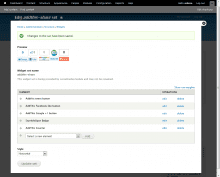
- When you’re finished, the widget set will look like the image below:

- Save the widget set.
- Go to Structure > Blocks and your widget will now show as a block. Publish this block.

- You should now be able to see the widget set live on the site.

- You’ll also be able to re-use this widget almost anywhere on the site using tokens. Your new widget set will appear in the list of available tokens found in Help > Token.

